
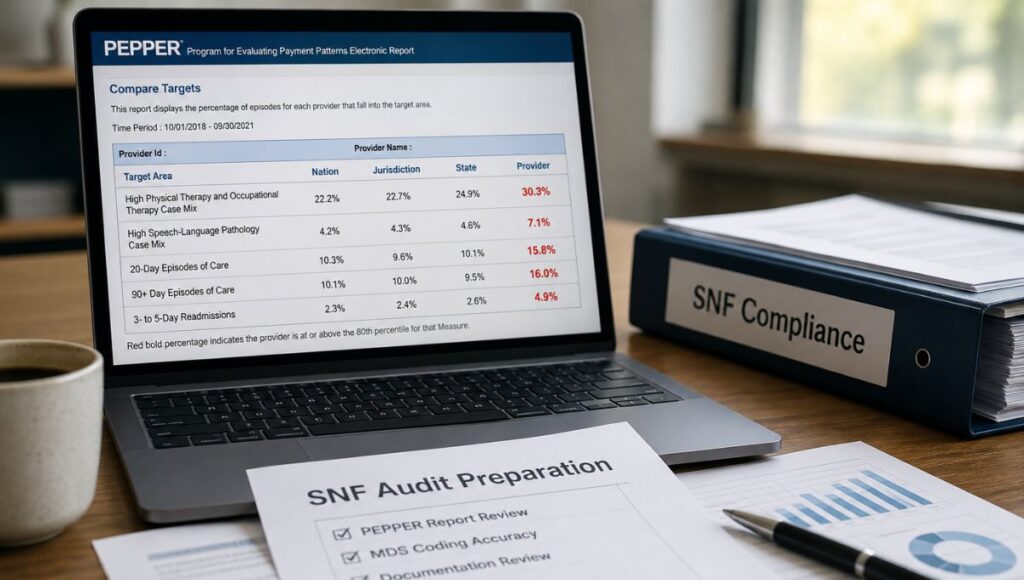
PEPPER stands for Program for Evaluating Payment Patterns Electronic Report. It’s a free report, sponsored by the Centers for Medicare & Medicaid Services (CMS), that compares your SNF’s Medicare billing data against national, state, and jurisdiction benchmarks across five specific target areas. (Source: SNF PEPPER User’s Guide, Tenth Edition, PEPPER.CBRPEPPER.org)
Most of what circulates about PEPPER audit preparation right now, including AI-generated summaries, describes outlier categories that don’t belong to the SNF version of the report at all. Getting the actual target areas right is where real audit preparation starts.
Quick Summary
PEPPER compares your SNF’s Medicare billing data to national, jurisdiction, and state benchmarks across five specific target areas. A red bold percentage means your facility sits at or above the 80th percentile, a statistical outlier position, not proof of a billing error. Preparing for a SNF audit with PEPPER means pulling the report annually, prioritizing outliers by percentile and volume together, and reviewing flagged claims before a Recovery Audit Contractor request arrives. The five current SNF target areas are narrower than most guidance describes, and that gap is worth closing first.
Table of Contents
What the PEPPER Report Actually Is
A 2012 Office of Inspector General review found that roughly one in four SNF claims contained a billing error. That finding is part of why CMS built PEPPER into SNFs’ compliance toolkit.
The report goes to a specific list: the Chief Executive Officer, Administrator, President, Quality Assurance and Performance Improvement Officer, or Compliance Officer. It’s accessed through a secure portal at PEPPER.CBRPEPPER.org, authenticated with a validation code tied to a recent Medicare Part A claim.
The underlying data comes from your facility’s UB-04 claims (the standard institutional claim form used for Medicare billing), covering the three most recent federal fiscal years. Each fiscal year runs October 1 through September 30. PEPPER compares your numbers against three groups: the nation, your Medicare Administrative Contractor (MAC) jurisdiction, and your state.
Why Most SNF PEPPER Guidance Gets the Target Areas Wrong
PEPPER isn’t one report. CMS sponsors a customized version for nearly every Medicare provider type, including short- and long-term acute care hospitals, critical access hospitals, inpatient rehabilitation and psychiatric facilities, hospices, home health agencies, and SNFs. Each version tracks a different set of target areas built around that provider type’s specific billing risks.
This matters because guidance circulating about SNF PEPPER preparation, including AI-generated summaries currently answering this exact question, lists outlier categories like one-day inpatient stays and short hospital stays as SNF risk areas. Those are hospital PEPPER target areas.
They don’t appear anywhere in the current SNF PEPPER User’s Guide. A facility building its audit prep checklist around them is auditing for the wrong report.
If a source describes SNF PEPPER risk in terms of inpatient stay length or hospital admission necessity, it borrowed language from the acute-care hospital version. The two reports share a name and a sponsor. They don’t share target areas.
The Five Current SNF PEPPER Target Areas
The Tenth Edition tracks five target areas. Two of them are new as of the Q4FY21 release, when CMS retired the PDPM (Patient Driven Payment Model) High Utilization Codes area entirely.
|
Target Area
|
What It Measures
|
|---|---|
|
High Physical Therapy and Occupational Therapy Case Mix
|
Share of claims where the PT/OT component of the HIPPS code falls into the highest case mix groups
|
|
High Speech-Language Pathology Case Mix
|
Share of claims where the SLP component of the HIPPS code falls into the highest case mix groups
|
|
20-Day Episodes of Care
|
Share of episodes ending at exactly 20 days, where Medicare coverage drops from 100% to 80%
|
|
90+ Day Episodes of Care
|
Share of episodes lasting 90 or more days, against the 100-day per-spell benefit maximum
|
|
3- to 5-Day Readmissions
|
Share of episodes involving readmission to the same SNF within three to five calendar days
|
Guidance still built around the retired PDPM High Utilization Codes area, common in content written before 2022, is auditing against a target that no longer exists.
The two case mix target areas are Minimum Data Set (MDS) coding flags, not billing flags. Their numerators come directly from HIPPS code characters generated by Section GG (the MDS section scoring a resident’s functional independence) and SLP-component coding. An outlier here points at the MDS coordinator’s documentation, not the billing coordinator’s claim.
How to Read the 80th Percentile | What Red Bold Means
PEPPER flags outliers using present control limits, not statistical significance testing. The upper control limit for every target area is the national 80th percentile. The two case mix areas also carry a lower control limit at the 20th percentile, since under-coding is a risk there too.
On your Compare Targets Report, a percentage in red bold means you’re at or above the 80th percentile for that target area, a high outlier. Green italics means you’re at or below the 20th percentile on a case mix area, a low outlier. Black text means you’re within the normal range.
Your national percentile deserves the most weight, since it compares you against every SNF in the country. Jurisdiction and state percentiles matter, but CMS treats them as lower priority, since smaller comparison groups can reflect regional practice patterns rather than genuine risk.
Percentile alone isn’t your priority signal. Percentile combined with target count is. A target area at the 80th percentile with a large claim count carries more audit exposure than one at the same percentile with only 11 or 12 claims. Review the high-volume outliers first.
PEPPER only displays statistics once your numerator count reaches 11 or more claims for a target area and time period. Below that threshold, CMS restricts the data and the target area shows blank.
Accessing and Reading Your Report
SNF PEPPER arrives as a Microsoft Excel workbook, not a PDF or dashboard. Navigate it through worksheet tabs: a Compare Targets Report tab, and individual Target Area Report tabs for each of the five areas.
The Compare Targets Report gives the fastest overview: your target count, percent, and percentile across all three comparison groups in one table. Each Target Area Report goes deeper, with a three-year trend graph and CMS’s suggested interventions for that specific area.
As of this writing, the official PEPPER training portal lists the Tenth Edition, version Q4FY21, as the current SNF PEPPER User’s Guide, with no newer edition posted. Check the portal directly before your next review, since CMS controls the release schedule.
What to Actually Do When a Target Area Flags Red
CMS built specific suggested interventions into each Target Area Report, and they differ by target area.
For the case mix areas, pull a sample of flagged claims and verify the medical record supports the MDS coding. Section GG functional scoring drives the PT/OT component. Five characteristics drive the SLP component: acute neurologic condition, SLP-related comorbidity, cognitive impairment, swallowing disorder, and mechanically altered diet.
For 20-day and 90+ day episodes, review the plan of care and discharge planning documentation. CMS points to a specific risk here: SNFs have a financial incentive to keep patients through day 20, when coverage is still at 100%, even after the skilled need has passed.
For 3- to 5-day readmissions, build a readmission data profile rather than reviewing charts one at a time. CMS suggests tracking patient identifier, admission and discharge dates, discharge status code, and diagnoses across every qualifying readmission. (Source: SNF PEPPER User’s Guide, Tenth Edition, Appendix 1)
Bring the right people into the review. CMS recommends an interdisciplinary team: director of nursing, MDS coordinator, therapy director, and business office manager, meeting regularly to confirm care, documentation, and billing all line up before claims go out.
Getting Section GG and MDS coding right at the source protects both the case mix target areas and the underlying reimbursement. Our guide to MDS coding accuracy covers the full submission requirements.
A facility can trend toward outlier status for a full year before PEPPER ever shows red. The reportable data threshold requires 11 or more claims before a target area even displays. Pulling PEPPER data annually catches a trend building beneath that threshold. Waiting for the next release means the trend already crossed it.
Being an outlier doesn’t prove a billing error occurred. But treating an outlier flag as noise until it turns red is exactly how a slow, one-year trend becomes a RAC selection.
PEPPER vs. RAC Audit | Two Different Things Working Together
PEPPER doesn’t identify improper payments, and it doesn’t trigger an audit on its own. It’s a comparison tool built to help your facility prioritize its own auditing and monitoring. A Recovery Audit Contractor (RAC) review, or a MAC’s Additional Documentation Request (ADR), is a separate, external process.
The connection between the two is preparation. Outlier data tells you where an external reviewer is statistically more likely to look. If the case mix documentation wouldn’t independently support a claim without the coding already on file, that’s the same weakness a Targeted Medical Review would test.
Run the internal review the same way you’d run a pre-submission check. Your facility’s Triple Check process already verifies HIPPS codes, claim dates, and supporting documentation before billing. Folding PEPPER-flagged claims into that same review adds outlier awareness without building a separate process from scratch.
Documenting the Review in Your QAPI Program
Since 2013, under Section 6102 of the Affordable Care Act, SNFs have been required to maintain a compliance program, with regular auditing and monitoring as an expected part of it. Log every PEPPER-driven review inside your facility’s Quality Assurance and Performance Improvement (QAPI) program: what triggered it, who reviewed it, what the sample found, and what corrective action followed.
This is also where coding-support software earns its place, without pretending to replace the review itself. LTC Apps Medical Code Analysis generates ICD-10 diagnostic codes from an uploaded PDF record or pasted clinical notes, compressing 15 to 30 minutes of manual code lookup into seconds.
It supports the upstream MDS and coding accuracy behind the case mix target areas. It doesn’t read your PEPPER report or run the audit for you.
For the full compliance documentation framework this fits into, including MDS timing and Triple Check requirements, see our SNF compliance documentation guide.
Is LTC Apps Right for Your Facility?
LTC Apps is built for you if:
- You operate a skilled nursing facility and want your team reviewing PEPPER data before a regulator does, not after
- You want the MDS and coding documentation behind your case mix numbers to hold up without a scramble
- You’re evaluating modular operations software built specifically for SNFs, not adapted from hospital systems
This is not the right fit if:
- You need a tool that reads and interprets your PEPPER report automatically
- You’re looking for a full clinical EHR with physician-facing charting
- You require an enterprise contract with a dedicated implementation team from day one
Here is what happens when you request a demo:
- A member of our team reaches out within 1 business day to schedule a call
- We run a 30-minute live walkthrough of the modules most relevant to your facility
- You get access to pricing specific to your facility size and module selection
Most facilities have a clear picture of fit and pricing within one week of reaching out.
Common questions before booking a demo: No long implementation timelines. Most facilities are live on their first module within 2 to 4 weeks. No minimum facility size. We work with single-facility operators and regional groups. If you’re mid-contract with another vendor, we can run a parallel evaluation so you’re ready to switch at contract end.
Frequently Asked Questions
PEPPER (Program for Evaluating Payment Patterns Electronic Report) is a free, CMS-sponsored report comparing your SNF's Medicare billing data against national, state, and jurisdiction benchmarks across five target areas, to help guide internal auditing.
Five: High Physical Therapy and Occupational Therapy Case Mix, High Speech-Language Pathology Case Mix, 20-Day Episodes of Care, 90+ Day Episodes of Care, and 3- to 5-Day Readmissions.
Your target area percentage is at or above the national 80th percentile (shown in red bold) or, for the two case mix areas, at or below the 20th percentile (green italics). It signals risk worth reviewing, not a confirmed billing error.
No. PEPPER is a self-comparison tool for internal monitoring. A Recovery Audit Contractor review or Additional Documentation Request is a separate, external claims review process.
Each release covers the three most recent federal fiscal years. As of this writing, the official PEPPER portal lists the Tenth Edition (Q4FY21 version) as current, with no newer edition posted. Check PEPPER.CBRPEPPER.org directly ahead of your next review.
The Chief Executive Officer, Administrator, President, Quality Assurance and Performance Improvement Officer, or Compliance Officer, through a secure portal authenticated with a validation code.
Ready to Get Ahead of Your Next PEPPER Review?
If you operate a skilled nursing facility and want your coding documentation ready before PEPPER or a RAC review ever asks for it, LTC Apps was built for exactly this. Or call 309-590-3455, or visit ltcapps.com to explore all 15 modules. Most facilities complete their first demo within one week of reaching out.